Transforming Data into Actionable Insights through Design

Introduction

At the age of fifteen, I secured a summer position at a furniture factory. To get the job, I expressed my interest in technology and programming to the owner, specifically regarding their newly acquired CNC machine. To demonstrate my capability, I presented my academic record and was hired to support a senior operator with the machine.

That summer, I was struck by the ability to control complex machinery through programmed commands on its control board. The design and layout of the interface, as well as the tangible results yielded from my input, highlighted the intersection of technical expertise and thoughtful design. This experience sparked my curiosity about the origins and development of such systems and functionalities.

I have always maintained that design is fundamentally about clarity, how systems make sense and elicit meaningful responses. It involves translating intricate, technical concepts into experiences that are intuitive and accessible. This perspective has guided my approach throughout my career, whether developing an AI-powered dashboard for Air Canada, creating an inclusive quoting tool for TD Insurance, or designing online public services for Ontario.

The central challenge remains consistent: achieving transparency and trust in complex environments. Effective design bridges the gap between people and systems, supporting purposeful engagement.

My observational nature drives me to understand how systems operate, decisions are reached, and individuals navigate complexity. This curiosity informs my design methodology, which begins by analyzing the foundational elements, people, processes, data, and technology, that must integrate seamlessly to deliver a cohesive experience.

To me, design is not merely an aesthetic layer; it serves as the essential framework that provides structure, clarity, and empathy within multifaceted systems. Designing from this perspective, I prioritize not only usability but also alignment across stakeholders and components.

My core design strengths

Throughout my career, I have found that my most effective work comes from applying a set of foundational strengths to every project. These strengths consistently guide my approach and ensure each solution is thoughtful, impactful, and built for real-world complexity.

Systems Thinking: I make it a priority to look beyond surface-level interfaces. My approach involves examining how data, people, and technology interact and influence each other within a system. By doing so, I can design solutions that are not only visually appealing but also deeply integrated and sustainable across the entire ecosystem.

Human-Centred Design: Every design decision I make is grounded in observation and empathy. I focus on the user’s experience, prioritizing how it feels to engage with the product or service. My aim is to create solutions that resonate with individuals on a practical and emotional level.

Accessibility & Inclusion: Designing for everyone is a fundamental principle for me. I strive to ensure that the experiences I create are not just compliant with accessibility standards, but are genuinely usable and fair for all users. Inclusion is woven into the fabric of my process, shaping outcomes that reflect the diversity of people who will interact with them.

Storytelling & Visualization: I leverage visual storytelling to simplify and clarify complex ideas. Using visuals, I help teams and stakeholders see both what we are building and why it matters. This approach fosters understanding and alignment, making the design process transparent and purposeful.

Facilitation & Collaboration: I believe that the best insights and solutions emerge when diverse voices contribute to the process. By facilitating collaboration, I encourage open dialogue and collective problem-solving, ensuring that outcomes are shaped by a broad range of perspectives and expertise.

If I had to distill all these strengths into a single guiding principle, it would be this: “I design to understand, not just to create.”

My design approach: a cyclical process

Design, for me, is less of a straight line and more of a cycle, a continuous rhythm of curiosity, synthesis, and iteration. This process shapes how I approach every project, ensuring that each step builds upon the previous insights and discoveries.

1. Understand the System: I begin by mapping the entire ecosystem, considering all the people involved, their goals, the relevant data, and any constraints. This foundational understanding allows me to see how different elements interact and influence each other.

2. Observe the Experience: Next, I dedicate time to watch, listen, and learn how people actually engage with the system. Through observation and empathy, I uncover genuine behaviours and needs that may not be immediately apparent.

3. Synthesize & Prioritize: I then translate my findings into clear opportunities and actionable design principles. This synthesis helps to focus efforts on what matters most, guiding the team toward solutions that address real challenges.

4. Visualize the Future: Prototyping and iteration are central to my approach. I work to make complexity feel simple and trustworthy, refining concepts until the design communicates clarity and confidence.

5. Deliver & Educate: Finally, I collaborate with developers, stakeholders, and accessibility teams to bring the vision to life. I also focus on making the solution scalable, ensuring that the impact and understanding extend as the project grows.

Good design isn’t just creative, it’s disciplined, methodical, and deeply human.

Projects that demonstrate impact

Transforming operations at Air Canada

At Air Canada, I was responsible for designing AI dashboards that transformed predictive data into clear, actionable insights. These dashboards provided operations teams with the tools to act quickly and effectively, which resulted in a significant reduction in delay response time, by 25%. This project highlighted the value of turning complex data into meaningful information that drives real-world improvements.

Advancing accessibility at TD Insurance

During my time at TD Insurance, I led an accessibility-first redesign of the Auto and Travel Quoter. My approach was centred on ensuring that the solution met the rigorous standards of WCAG 2.1 AA compliance. The redesign not only made the product fully accessible, but also drove an 18% increase in conversions. This experience reinforced the importance of designing for everyone and demonstrated how accessibility can be a catalyst for business growth.

Simplifying government services for Ontarians

With the Ontario Ministry of Transportation, I took on the challenge of redesigning a complex government service. My focus was on simplifying the process for citizens, making it easier and more intuitive to use. The result was a 40% reduction in form completion time, making government interactions smoother and more efficient for the people of Ontario.

Clarity as a catalyst

What stands out to me about these projects is that each one demonstrates a universal truth: clarity scales. When people have a clear understanding of what they are doing and why, efficiency, trust, and accessibility naturally follow. These outcomes prove that good design is not just about aesthetics, it’s about making information actionable and understandable, leading to measurable impact.

Reflection

The best design doesn’t add more, it removes confusion. It connects people, systems, and intent, turning complexity into clarity.

If your organization is wrestling with complexity, whether that’s data, accessibility, or AI, that’s exactly where design can make the biggest difference.

At Mimico Design House, we specialize in helping teams turn that complexity into clarity, mapping systems, simplifying experiences, and designing interfaces that people actually understand and trust.

Through a combination of human-centered design, systems thinking, and accessibility expertise, I work with organizations to bridge the gap between business strategy and user experience, transforming friction points into moments of understanding.

If your team is facing challenges with alignment, usability, or data-driven decision-making, I’d love to explore how we can help.

You can connect with me directly on LinkedIn or visit mimicodesignhouse.com to learn more about how we help organizations design systems people believe in.

Bringing Ideas to Life: My Journey as a Product Architect

My work is about helping clients and organizations bring their ideas to life, transforming understanding into development, and development into reality, with as little friction and as much functionality as possible.

Lately, I have been reflecting on what drew me, as a designer, to write about topics such as artificial intelligence and quantum computing. I have been fascinated with both topics and how they have transformed that way we view the world. Everything we see today in terms of advancements in AI and quantum computing started with an idea, brought to life through innovation and perseverance.

In AI, there was the idea that machine learning would transform the way we do business by leveraging large amounts of data to provide valuable insights, something that would not be easily attainable through human effort. In quantum computing, there was the idea that applying the way particles behave in the universe to computing would unlock a vast potential for computing capabilities and power, beyond what classical computers can achieve. So many other advancements and achievements in AI and quantum computing continue to be realized through the conception of ideas and the relentless pursuit of ways and methods to implement them.

Everything starts with an idea

Beyond AI and quantum computing, everything we see around us started with an idea, brought to life through continued and persistent effort to make it a reality. Every building we see, every product, every service and all material and immaterial things in our lives are the product of an idea.

As a designer and product architect, I also help make ideas a reality through persistent effort and the application of methodology that lays a roadmap for the implementation of those ideas. Similarly, AI and quantum computing are fields that are bringing novel and exciting concepts to life through the development and application of scientific methodology.

While thinking about all of this, I pondered how I would define my work and role as a designer. How would I describe my work, knowing that most of us use technology without thinking about the journey a product takes from idea to experience? What value do I bring to organizations that hire me to help them with their problems? In an age where products are incorporating ever more advanced and sophisticated technology, as is the case with AI and quantum computing, how does my work extend beyond simply developing designs and prototypes?

To answer these questions, I am drawn back to the fact that everything around us starts with an idea. As a designer, it is extremely rewarding to me to help make ideas for my clients a reality while navigating the conceptual, technical and implementation challenges.

Making the invisible useful

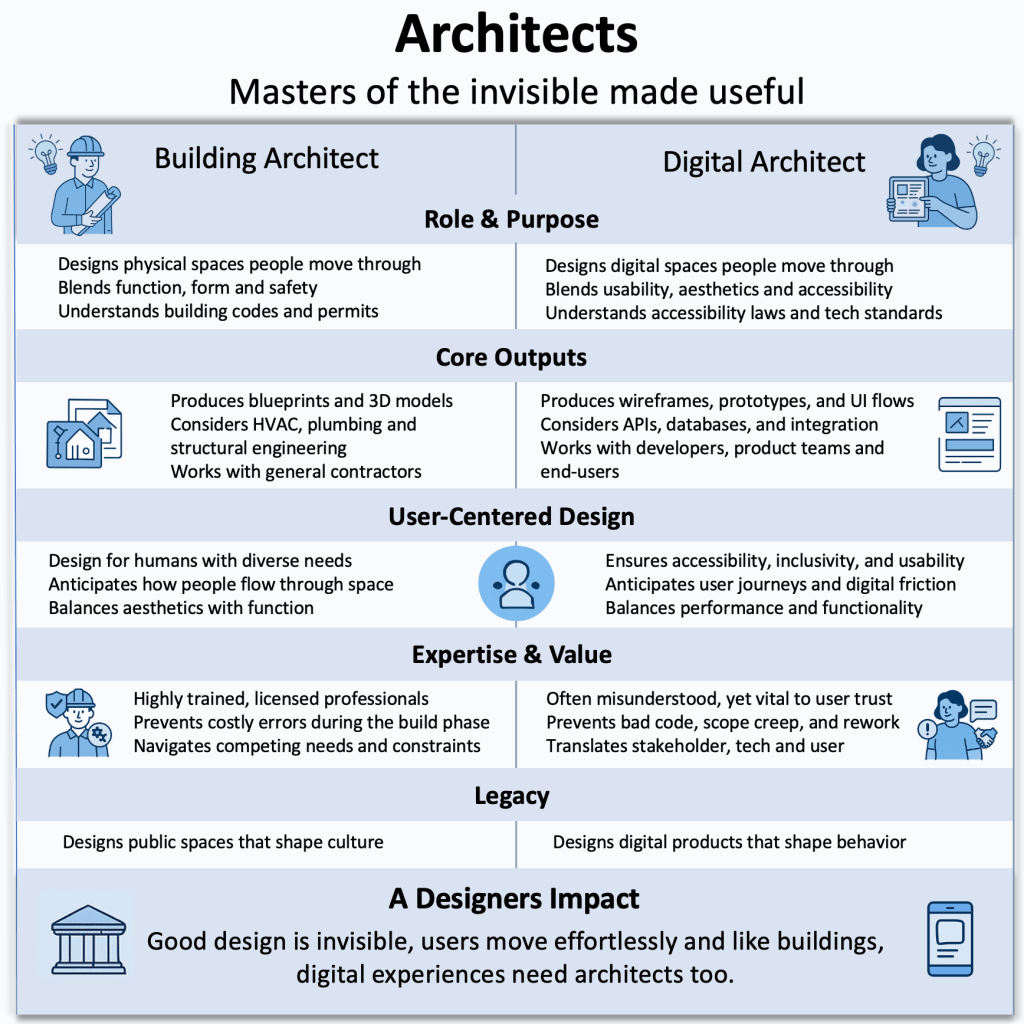
I’ve been thinking a lot about the similarities between how we design physical spaces and how we design digital ones. Just like a building starts as an idea in an architect’s mind, so are the products that I work on and help a multitude of organizations bring to life. As a designer, I help lay the foundations for a product idea by thoroughly understanding the motivations and needs behind it, and what benefits and improvements implementing it would bring.

Buildings serve needs by providing housing for people or serving as places to work, and for businesses and organizations to operate. A well-designed building offers an effortless flow that draws people in and makes them want to stay. Similarly, great digital design allows for seamless navigation, creating an experience that feels natural and engaging. Before an architect devises plans and drawings for a building, they must first maintain a clear vision of the idea in their mind, understand the needs behind it and ensure that their designs and plans meet those needs.

From there, the idea and concept of the building in the architect’s mind are translated into plans and drawings. Those plans are drawn and shared with a builder, who in turn collaborates with the architect to bring them to life. Without the architect and their clear vision of the idea and concept behind the building, the building would not exist, at least not in the shape and form that the architect would have imagined. It would not properly serve the needs and bring about the benefits that accompanied the original idea.

Just like a building architect, as a product architect I must also understand the needs behind digital products to create experiences that truly serve the user. Through this process, I envision flows and interactions that will enable users to achieve their goals in the simplest and easiest way possible, reducing friction while also achieving the desired business value and benefit. Like an architect, I collaborate with members of technical teams so that the idea behind the product can be realized to its full potential through detailed roadmaps, designs and prototypes.

Figure 1. Architects are masters of the invisible made useful.

An architect must possess technical and creative skills that enable them to visualize the idea of a building. The same is true for me as a product architect. Without the ability to clearly articulate complex technical concepts through detailed designs and specifications while also applying a creative lens, product ideas would not be realized to their full potential.

In summary, how do I define my work? My work is about helping clients and organizations bring their ideas to life, transforming understanding into development, and development into reality, with as little friction and as much functionality as possible. I can help you and your organization achieve the same. Let me show you how.

Dashboards Drive Great User Experience

A dashboard must enable the user to gain the information and insights they need “at a glance”, while also enabling them to better perform their tasks, and enhance their user experience overall. 

Introduction 

Whenever I drive my car, I am reminded of how its dashboard allows me to maintain control and remain aware of all the actions I need to take, while also being able to pay attention to my driving. My car’s dashboard indicates critical information to me like speed, engine oil temperature, and fuel level among other critical information. As the driver, it is essential for me to remain aware of these data points while I focus on the important task of driving, and the actions of other drivers around me.  

Like many applications, a car’s dashboard provides insight into the car’s inner workings in a user-friendly and intuitive manner, allowing the user to see and act upon information without needing to understand the technical details or the engineering behind it. This is why designing an application around a dashboard, not the other way around, makes sense in ensuring that the application’s features all cater to the data and information needs of the user.  

It is possible to architect an entire application and its features by thinking about the various components that exist on the dashboard, what information they will convey, and how the user will interact with these components. When a dashboard is designed around the user’s needs, the various components of the application must be designed such that they enable the dashboard components to receive the input they need and output the data users expect.  

In the age of AI-focused applications that require the design and development of models to support business requirements and deliver valuable insights, designing an effective dashboard focuses AI teams efforts on building models that deliver impactful output, reflected on the dashboard. 

Types of dashboards 

Dashboard can vary depending on user needs. Those needs can vary depending on whether the dashboard must enable high-level or in-depth analysis, the frequency of data updates required, and the scope of data the dashboard must track. Based on this, dashboards can be categorized into three different categories [1]: 

  • Strategic dashboards: Provide high-level metrics to support making strategic business decisions such as monitoring current business performance against benchmarks and goals. An example metric would be current sales revenue against targets and benchmarks set by the business. A strategic dashboard is mainly used by directors or high-level executives who rely on them to gain insights and make strategic business decisions.  
  • Operational dashboards: Provide real-time data and metrics to enable users to remain proactive and make operational decisions that affect business continuity. Operational dashboards must show data in a clear and easy to understand layout so that users can quickly see and act upon the information displayed. They must also provide the flexibility for users to customize notifications and alerts so that they do not miss taking any important actions. For example, airline flight operations planners may require the ability to monitor flight status and be alerted to potential delays. Some of the metrics a dashboard could show in this case are the status of gate, crew or maintenance operations. 
  • Analytical dashboards: Analytical dashboards use data to visualize and provide insight into both historical and current trends. Analytical dashboards are useful in providing business intelligence by consolidating and analyzing large datasets to produce easy to understand and actionable insights, specifically in AI applications that use machine learning models to product insights. For example, in a sales application the dashboard can provide insight into the number of leads and a breakdown of whether they were generated through phone, social media, email or a corporate website.  

Design principles and best practices 

Much like a car dashboard, an application dashboard must abstract the complexities of the data it displays to enable the user to quickly and easily gain insights and make decisions. To achieve these objectives, the following design principles and best practices should be considered.  

  • Dashboard “architecture”: It is important to think about what the dashboard must achieve based on the dashboard types describes above. Creating a dashboard with clarity, simplicity, and a clear hierarchy of data laid out for quick assessment, ensures that the information presented on the dashboard does not compete for the user’s attention. A well architected dashboard does not overwhelm the user such that they are unable to make clear decisions. It acts as a co-pilot producing all the information the user needs, when they need it.  
  • Visual elements: Choosing the correct visual elements to represent information on the dashboard ensures that the user can quickly and easily interpret the data presented. Close attention should be paid to: 
    • Using the right charts to represent information. For example, use a pie chart instead of a bar chart if there is a need to visualize data percentages. 
    • Designing tables with a minimal number of columns such that they are not overwhelming to the user, making it harder to interpret them. 
    • Paying attention to color coding ensures that charts can be easily scanned without the user straining to distinguish between the various elements the charts represent. It is also important to ensure that all colors chosen contrast properly with each other and that all text overlaid on top of the charts remains easy to read and accessible. 
    • Providing clear definitions for symbols and units ensures no ambiguity as to how to interpret the data presented on the dashboard. 
  • Customization and interactivity: Providing users with the flexibility to customize their dashboard allows them to create a layout that works best for their needs. This includes the ability to add or remove charts or tables, the ability to filter data, drill down and specify time ranges to display the data, where applicable.  
  • Real-time updates and performance: Ensuring that dashboard components and data update quickly and in real-time adds to the dashboard usability and value. This is best achieved by ensuring an efficient design to the dashboard components, such that they display only the information required unless the user decides to interact with them and perform additional filtering or customization. 

When implementing dashboards, the Exploration, Preparation, Implementation and Sustainment (EPIS) framework provides a roadmap for designers and developers to design and develop effective dashboards [2]. Combining human-centered methodology during the exploration and preparation phases of EPIS ensures that the dashboard meets users’ needs and expectations, while implementation science methods are especially important during the implementation and sustainment phases [3]. Care must be taken when implementing dashboards and EPIS provides an excellent framework that will be discussed in more detail in a subsequent article.  

Conclusion 

I always admire the design, layout, and clarity of the information presented to me on my car’s dashboard. The experience I receive when driving my car, through the clear and intuitive design of its dashboard components and instruments, makes every drive enjoyable. All the information I need is presented in real-time, laid out clearly and placed such that it allows me to focus on the task of driving while also paying attention to how my car is behaving. I can adjust, tune and customize the dashboard components in a way that further enhances my driving experience and adds to my sense of control of the car. 

The properties of a car dashboard reflect exactly how an application dashboard must behave. While the user of an application may be using the dashboard under a different context than driving a car, the principles of user experience, interaction design and overall usability still apply. A dashboard must enable the user to gain the information and insights they need “at a glance”, while also enabling them to better perform their tasks, and enhance their user experience overall.  


Designing solutions that work for users is what fuels my work. I’d love to connect and talk through your design ideas or challenges, connect with me today LinkedIn or contact me on Mimico Design House.

References 

[1] Dashboard Types Guide: Strategic, Operational, Tactical + More 

[2] Aarons GA, Hurlburt M, Horwitz SM. Advancing a conceptual model of evidence-based practice implementation in public service sectors. Adm Policy Ment Health. 2011;38(1):4–23. 

[3] From glitter to gold: recommendations for effective dashboards from design through sustainment 

How To Build Large Language Models

Introduction 

Large Language Models (LLMs) are Artificial Intelligence algorithms that use massive data sets to summarize, generate and reason about new content. LLMs are built on a set of neural networks based on the transformer architecture. Each transformer consists of encoders and decoders that can understand text sequence and the relationship between words and phrases in it. 

The generative AI technologies that have been enabled by LLMs have transformed how organizations serve their customers, how workers perform their jobs and how users perform daily tasks when searching for information and leveraging intelligent systems. To build an LLM we need to define the objective of the model and whether it will be chatbot, code generator or a summarizer.  

Building an LLM 

Building an LLM requires the curation of vast datasets that enable the model to gain a deep understanding of the language, vocabulary and context around the model’s objective. These datasets can span terabytes of data and can be grown even further depending on the model’s objectives [1].  

Data collection and processing 

Once the model objectives are defined, data can be gathered from sources on the internet, books and academic literature, social media and public and private databases. The data is then curated to remove any low-quality, duplicate or irrelevant content. It is also important to ensure that all ethics, copyright and bias issues are addressed since those areas can become of major concern as the model develops and begins to produce the results and predictions it is designed to do. 

Selecting the model architecture 

Model selection involves selecting the neural network design that is best suited for the LLM goals and objectives. The type of architecture to select depends on the tasks the LLM must support, whether it is generation, translation or summarization.  

  • Perceptrons and feed-forward networks: Perceptrons are the most basic neural networks consisting of only input and output layers, with no hidden layers. Perceptrons are most suitable for solving linear problems with binary output. Feed-forward networks may include one or more layers hidden between the input and output. They introduce non-linearity, allowing for more complex relationships in data [2]. 
  • Recurrent Neural Networks (RNNs): RNNs are neural networks that process information sequentially by maintaining a hidden state that is updated as each element in the sequence is processed. RNNs are limited in capturing dependencies between elements within long sequences due to the vanishing gradient problem, where the influence of distant input makes it difficult to train the model as their signal becomes weaker.   
  • Transformers: Transformers apply global self-attention that allows each token to refer to any other token, regardless of distance. Additionally, by taking advantage of parallelization, transformers introduce features such as scalability, language understanding, deep reasoning and fluent text generation to LLMs that were never possible with RNNs. It is recommended to start with a robust architecture such as transformers as this will maximize performance and training efficiency. 
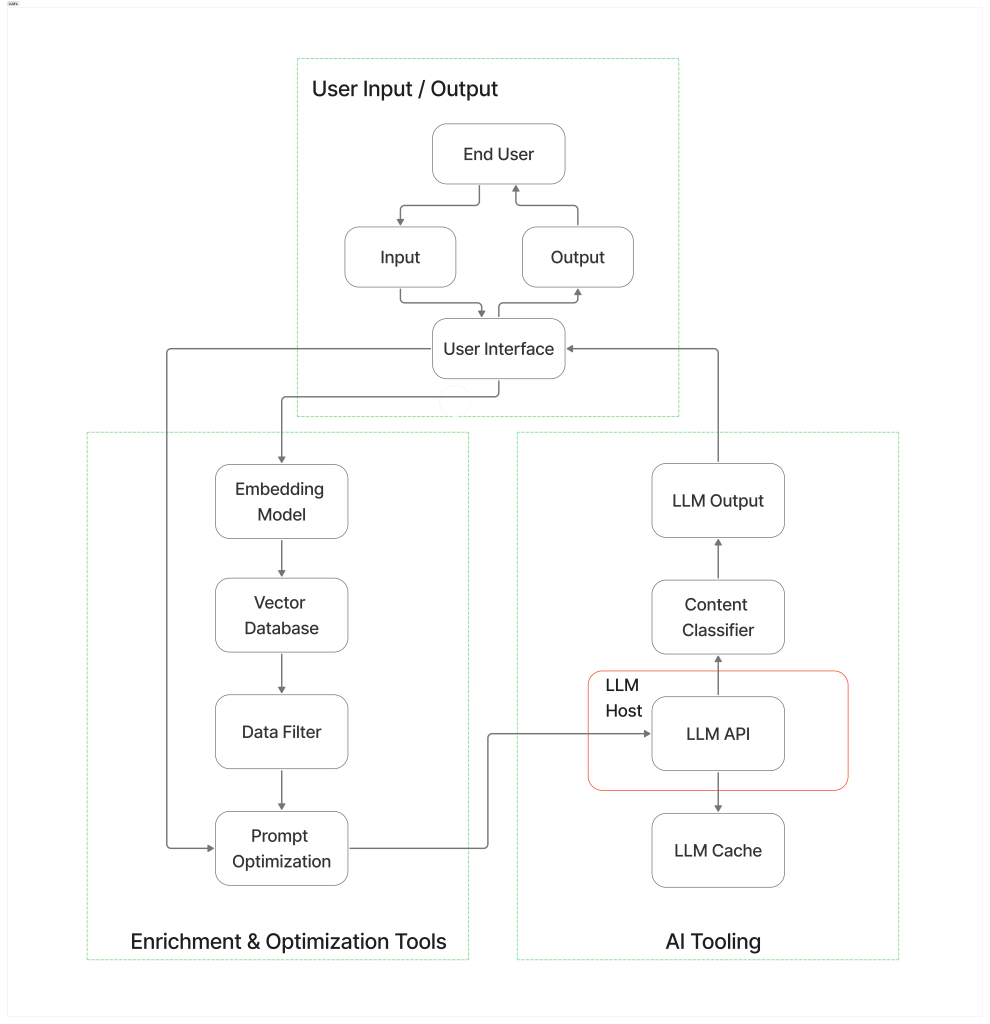
Figure 1. Example of an LLM architecture [3].

Implementing the model 

Implementing the model requires using a deep learning framework such as TensorFlow or PyTorch to design and assemble the model’s core architecture [4]. The key steps in implementing the model are: 

  • Defining the model architecture such as transformers and specifying the key parameters including the number of heads and layers.  
  • Implementing the model by building the encoder and decoder layers, the attention mechanisms, feed-forward networks and normalizing the layers.  
  • Designing input/output mechanisms that enable tokenized text input and output layers for predicted tokens. 
  • Using modular design and optimizing resource allocation to scale training for large datasets. 

Training the model 

Model training is a multi-phase process requiring extensive data and computational resources. These phases include: 

  1. Self-supervised learning where the model is fed massive amounts of data, so that it can be trained in language understanding and predicting missing words in a sequence.  
  2. Supervised learning where the model is trained to understand prompts and instructions allowing it to generalize, interact and follow detailed requests.  
  3. Reinforcement learning with Human Feedback (RLHF) involves learning with human input to ensure that output matches human expectations and desired behaviour. This also ensures that the model avoids bias and harmful responses and that the output is helpful and accurate.  

Fine tuning and customization 

Customization techniques include full model fine-tuning where all weights in the model are adjusted to focus on task-specific data. It is also possible to fine-tune parameters and engineer prompts to focus on smaller modules, saving resources and enabling easier deployment.  

Training a pre-trained model based on domain-specific datasets allows the model to specialize on target tasks. This is easier and less resource-intensive than training a model from scratch since it leverages the base knowledge already learned by the model. 

Model deployment 

Deploying the LLM makes it available for real-world use, enabling users to interact with it. The model is deployed on local servers or cloud platforms using APIs to allow other applications or systems to interface with it. The model is scaled across multiple GPUs to handle the growing usage and improve performance [5]. The model is continually monitored, updated and maintained to ensure it remains current and accurate.   

Ethical and legal considerations 

The ethical and legal considerations are important in the development and deployment of LLMs. It is important that the LLM is unbiased and that it avoids propagating unfair and discriminatory outputs. This extends to discriminatory and harmful content which can be mitigated through reinforcement learning with human feedback (RLHF).  

Training data may contain sensitive and private information, and the larger the datasets used to train the model the greater the privacy risks they involve. It is essential that privacy laws are adhered to and followed to ensure the models can continue to evolve and develop while preventing unintended memorization or leakage of private information. 

Copyright and intellectual property must also be protected by ensuring that the proper licenses are obtained. Regular risk and compliance assessments and proper governance and oversight over the model life cycle can help mitigate ethical and legal issues.  

Conclusion 

Developing and deploying an LLM in 2025 requires a combination technical, analytical and soft skills. Strong programming skills in Python, R and Java are critical to AI development. A deep understanding of machine learning and LLM architectures including an understanding of the foundational mathematical concepts underlying them, are also critical. It is also important to have a good understanding of hardware architectures including CPUs, GPUs, TPUs and NPUs to ensure that the tasks performed by the LLM are deployed on the most suitable hardware to ensure efficiency, scalability and cost-effectiveness.    

Other skills related to data management, problem-solving, critical thinking, communication and collaboration, and ethics and responsible AI are also essential in ensuring the models remain useful and sustainable. 

References 

[1] The Ultimate Guide to Building Large Language Models 

[2] Feedforward Neural Networks 

[3] The architecture of today’s LLM applications  

[4] How to Build a Large Language Model: A Comprehensive Guide 

[5] Large Language Model Training in 2025  

The Evolution of Large Language Models: From Recurrence to Transformers

While LLMs and their revolutionary transformer technology continue to impress us with new milestones, their foundations are deeply rooted in decades of research conducted in neural networks at countless institutions, and through the work of countless researchers.

Introduction

Large Language Models (LLMs) have gained momentum over the past five years as their use proliferated in a variety of applications, from chat-based language processing to code generation. Thanks to the transformer architecture, these LLMs possess superior abilities to capture the relationships within a sequence of text input, regardless of where in the input those relationships exist.

Transformers were first introduced in a 2017 landmark paper titled “Attention is all you need” [1]. The paper introduced a new approach to language processing that applied the concept of self-attention to process entire input sequences in parallel. Prior to transformers, neural architectures handled data sequentially, maintaining awareness of the input through hidden states that were recurrently updated with each step passing its output as input into the next.

LLMs are only an evolution of decades old artificial intelligence technology that can be traced back to the mid 20th century. While the breakthroughs of the past five years in LLMs have been propelled by the introduction of transformers, their foundations were established and developed over decades of research in Artificial Intelligence.

The History of LLMs

The foundations of Large Language Models (LLMs) can be traced back to experiments with neural networks conducted in the 1950s and 1960s. In the 1950s, researchers at IBM and Georgetown University investigated ways to enable computers to perform natural language processing (NLP). The goal of this experiment was to create a system that allowed translation from Russian to English. The first example of a chatbot was conceived in the 1960s with “Eliza”, designed by MIT’s Joseph Weizenbaum, and it established the foundations for research into natural language processing.

NLPs relied on simple models like the Perceptron, which were simple feed-forward networks without any recurrence features. Perceptrons were first introduced by Frank Rosenblatt in 1958. They were a single-layer neural network, based on an algorithm that classified input into two possible categories, and tweaked its predictions over millions of iterations to improve accuracy [3]. In the 1980s, the introduction of Recurrent Neural Networks (RNNs) improved on perceptrons by handling data sequentially while maintaining feedback loops in each step, further improving learning capabilities. RNNs were better able to understand and generate sequences through memory and recurrence, something perceptrons could not do [4]. Modern LLMs improved further on RNNs by enabling parallel rather than sequential computing.    

In 1997, Long Short-Term Memory (LSTM) networks introduced deeper and more complex neural networks that could handle greater amounts of data. Fast forward to 2019, a team of researchers at Google introduced the Bidirectional Encoder Representations from Transformers (BERT) model. BERT’s innovation was its bidirectionality which allowed the output and input to take each other’s context into account. This allowed the pre-trained BERT to be fine-tuned with just one additional output layer to create state-of-the-art models for a range of tasks [5].

From 2019 onwards, the size and capabilities of LLMs grew exponentially. By the time OpenAI released ChatGPT in November 2022, the size of its GPT models was growing in staggering amounts, until it reached an estimated 1.8 trillion parameters in GPT-4. These parameters include learned model weights that control how input tokens are transformed layer by layer, as discussed later in this article. ChatGPT allows non-technical users to prompt the LLM and receive a response quickly. The more the user interacts with the model, the better the context it can build, thus allowing it to maintain a conversational type of interaction with the user.

The LLM race was on. All the key industry players began releasing their own versions of LLMs to compete with OpenAI. To respond to ChatGPT, Google released Bard, while Meta introduced LLaMA (Large Language Model Meta AI). Microsoft had partnered with OpenAI in 2019 and built a version of its Bing search engine powered by ChatGPT. DataBricks also released its own open-source LLM, named “Dolly”

Understanding Recurrent Neural Networks (RNNs)

The inherent characteristic of Recurrent Neural Networks (RNNs) is their memory or hidden state. RNNs process input sequentially, token by token, with each step considering the current input token and the current hidden state to calculate a new hidden state. The hidden state acts as a running summary of the information seen so far in the sequence. RNNs understand a sequence by processing them word by word, while keeping a running summary of the words seen so far [6].

The recurrent structure of RNNs means that they perform the same computation at each step, with their internal state changing based on the input sequence. Therefore, if we have an input sequence x = (x1, x2, …, xt), the RNN updates its hidden state ht at time step t using the current input xt and the previous hidden state ht-1. This can be formulated as:

Where:

  • ht is the new hidden state at time step t
  • ht-1 is the hidden state from the previous time step
  •  xt is the input vector at time step t
  •  Whh and Wxh are the shared weight matrices across all time steps for hidden-to-hidden and input-to-hidden connections, respectively.
  •  bh is a bias vector
  • tanh is a common activation function (hyperbolic tangent), introducing non-linearity. 

This process can be visualized by breaking out the RNN timeline to show a snapshot of the system at each step in time, and how the hidden state is updated and passed from one step to the next.

Figure 1. An RNN through time. The RNN cell processes input and the hidden state from time t-1 to produce the hidden state that is used as input together with token input from time t.

Limitations of RNNs

The sequential nature of RNNs limits their ability to process tasks that contain long sequences. This may be one of the main limitations that gave rise to the development of the transformer architecture and the need to process sequences much faster and in parallel. The following are some of the main limitations of RNNs.

Limitations in modeling long-range dependencies: RNNs are limited in capturing dependencies between elements within long sequences. This limitation is due primarily to the vanishing gradient problem. As gradients (error signals) occur during later steps in time, it becomes increasingly more difficult for the signal to flow backwards to earlier time steps and adjust the weights. This is because the longer the sequence the fainter the signal becomes. As the signal becomes weaker, by the time it reaches the relevant steps it becomes increasingly more difficult for the network to learn and trace back the relationship between those earlier inputs and the later outputs.

Sequential processing: RNNs process sequences token by token, in order. Hidden states must also be processed sequentially such that to obtain the hidden state at time t, the RNN must use the hidden state from t-1 as input. Modern hardware like GPUs and TPUs are well equipped to work with parallel computation. RNNs are unable to make use of this hardware due to their sequential processing, which leads to longer training times compared to parallel architectures.

Fixed size of hidden states: In the sequence-to-sequence model, the encoder must process and compress the entire input sequence into a single fixed size vector. This vector is then passed to the RNN decoder which is used to generate the output for the next hidden state. The compression of potentially long and complex input sequences into fixed-size vectors can be challenging. It also makes it difficult to retrain the network on all the input details that may have been compressed, and thus potentially causing some important information required for training to be missed.

How Transformers Replaced Recurrence

The limitations of RNNs in optimizing learning over large sequences and their sequential processing gave rise to the transformer architecture. Instead of sequential processing, transformers introduced self-attention, enabling the network to learn from any point in the sequence, regardless of distance.

Self-attention in transformers is analogous to the way humans process long sequences of text. When we attempt to translate text or process complex sequences, we do not read the entire text and then attempt to translate or understand it. Instead, we tend to go back and review parts of the text that we determine are most relevant to our understanding of it, so that we can generate the output we are trying to produce. In other words, we pay attention to the most relevant parts of the input that will help us generate the output. Transformers apply global self-attention that allows each token to refer to any other token, regardless of distance. Additionally, by taking advantage of parallelization, transformers introduce features such as scalability, language understanding, deep reasoning and fluent text generation to LLMs that were never possible with RNNs.

How Transformers Pay Attention

Self-attention enables the model to refer to any token in the input sequence and capture any complex relationships and dependencies within the data [7]. Self-attention is computed through the following steps.

1. Query, Key, Value (Q,K,V) matrices
  • Query (Q): Represents what current information is required or must be focused on. This can be described by asking the question “What information is the most relevant right now?”
  • Key (K): Keys act as identifiers for each input element. They are compared against the input sequence to determine relevance. This is analogous to asking the question “does this input token match the information I am looking for?”
  • Value (V): Values are also associated with each input token and represent the content or the meaning of that token. Values are weighted and summed to produce the context vector, which can be described as “this is the information I have”.

The model performs a lookup for each Query across all Keys. The degree to which a Query matches a Key determines the weight assigned to the corresponding Value. The model then calculates a weight or an attention score that determines how much attention a token should receive when generating predictions. The attention scores are used to calculate a weighted sum of all the Value vectors from the input sequence. The result is a vector containing the weighted sum of all the weighted value vectors.

Figure 2. Calculating the weighted sum vector. Attention scores are multiplied by the Value (input) vectors which are then summed to produce the weighted sum vector.

We have already discussed how traditional RNNs struggle to retain information for distant input due to the sequential nature of their hidden state. Attention, on the other hand, allows the model to consider the weights of all inputs and by summing them up. The resulting vector incorporates information from all inputs with the proper weights assigned to them. This allows the model to have a context of all input, while focusing on the most relevant information in the sequence, regardless of their distance.

2. Multi-head attention

When we consider a sentence, we do not consider it one word at a time. Instead, we look at each specific word in the sentence and consider whether it is the subject or the object. We also consider the overall grammar to make sense of the sentence and what it is trying to convey.

The same analogy applies when calculating attention. Instead of performing a single attention calculation for the Q, K, V vectors, multiple calculations are performed each on a single attention head, such that each head looks at a different pattern or relationship in the sequence. This is the concept of multi-head attention which allows the parallel processing of the Q, K, V vectors. It allows the model to look at different patterns or relationships within the sequence.

3. Masked multi-head self-attention

Masking ensures that the head focuses only on the tokens received so far when generating output, without looking ahead into the input sequence to generate the next token.

  • Attention score: The dot product of the Q and K matrices is used to determine the alignment of each Query with each Key, producing a square matrix reflecting the relationship between all input tokens.
  • Masking: A mask is applied to the resulting attention matrix to positions the model is not allowed to access, thus preventing it from ‘peeking’ when predicting the next token.
  • Softmax: After masking, the attention score is converted into probability using the Softmax function. The Softmax function applies a probability distribution to a vector whose size matches the vocabulary of the model, called logits. For example, if the model has a vocabulary of 50,000 words, the output logits vector will have a dimension of 50,000. Each element in the logits vector corresponds to a score for one specific token in the vocabulary. The Softmax function takes the logits vector as input, and outputs a probability vector that represents the model’s predicted probability distribution over the entire vocabulary of the model for the current position in the output sequence. 

When it calculates attention for the Q, K, V vectors, the model does not recalculate attention for the same original Q, K, V vectors. Rather, it learns separate linear projections for each head. If we have h attention heads, then each head i learns the projection matrices

Each head performs the scaled Dot-Product Attention calculation using its projected Qi, Ki, Vi:

Where dis the dimension of the Ki vectors within each head. Each projection of Qi, Ki, Vi allows a head to focus on and learn from a different representation of the original input. By running these calculations in parallel the model can learn about different types of relationships within the sequence.

4. Output and concatenation

The final step is to concatenate the output from all attention heads and apply a linear projection, using a learned weight matrix, to the concatenated output. The concatenated output is fed into another linear feedforward layer, where it is normalized back to a constant size to preserve the original meaning of the input before it is passed deeper into additional layers in the network [8].

Conclusion

There is no doubt that transformers have revolutionized the way LLMs have been deployed and applied in a variety of applications, including chatbots, content creation, agents and code completion. By relying on large and ever-growing volume of parameters, and an architecture that is designed for scalability and parallel computing, we are only beginning to discover the breadth of applications transformers can have.

As the challenges facing LLMs continue to be overcome, such as the ethical and environmental concerns, we can expect them to continue to become more efficient, more powerful and ultimately more intelligent. While LLMs and their revolutionary transformer technology continue to impress us with new milestones, their foundations are deeply rooted in decades of research conducted in neural networks at countless institutions, and through the work of countless researchers.

References

[1] Ashish Vaswani, Noam Shazeer, Niki Parmar, Jakob Uszkoreit, Llion Jones, Aidan N. Gomez, Łukasz Kaiser, Illia Polosukhin. “Attention Is All You Need.” In Proceedings of the 31st Conference on Neural Information Processing Systems (NeurIPS 2017). arXiv:1706.03762 cs.CL, 2017

[2] The history, timeline, and future of LLMs

[3] Cornell Chronicle

[4] Deep Neural Networks: The 3 Popular Types (MLP, CNN and RNN)

[5] Large language models: their history, capabilities and limitations

[6] RNN Recap for Sequence Modeling

[7] Transformer Explainer

[8] What is a transformer model?