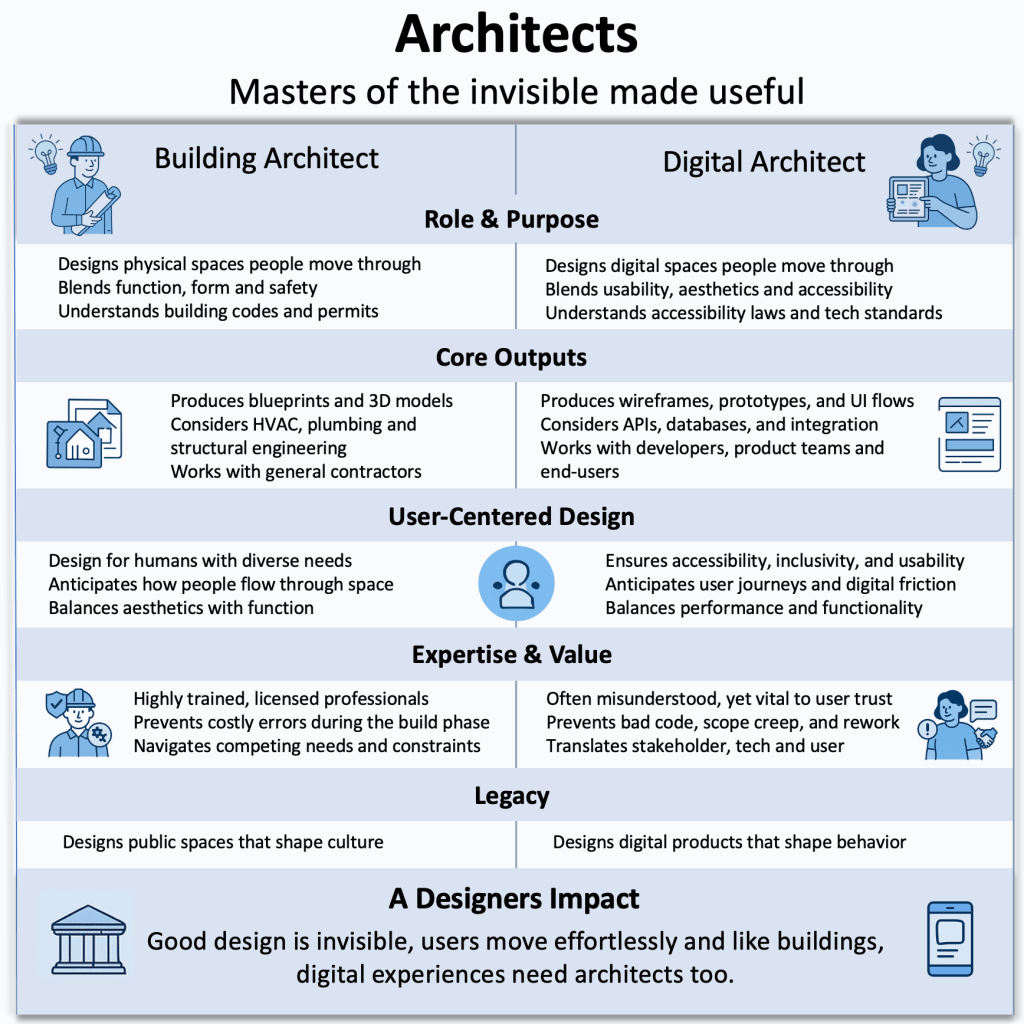
Dashboards Drive Great User Experience

A dashboard must enable the user to gain the information and insights they need “at a glance”, while also enabling them to better perform their tasks, and enhance their user experience overall. 

Introduction 

Whenever I drive my car, I am reminded of how its dashboard allows me to maintain control and remain aware of all the actions I need to take, while also being able to pay attention to my driving. My car’s dashboard indicates critical information to me like speed, engine oil temperature, and fuel level among other critical information. As the driver, it is essential for me to remain aware of these data points while I focus on the important task of driving, and the actions of other drivers around me.  

Like many applications, a car’s dashboard provides insight into the car’s inner workings in a user-friendly and intuitive manner, allowing the user to see and act upon information without needing to understand the technical details or the engineering behind it. This is why designing an application around a dashboard, not the other way around, makes sense in ensuring that the application’s features all cater to the data and information needs of the user.  

It is possible to architect an entire application and its features by thinking about the various components that exist on the dashboard, what information they will convey, and how the user will interact with these components. When a dashboard is designed around the user’s needs, the various components of the application must be designed such that they enable the dashboard components to receive the input they need and output the data users expect.  

In the age of AI-focused applications that require the design and development of models to support business requirements and deliver valuable insights, designing an effective dashboard focuses AI teams efforts on building models that deliver impactful output, reflected on the dashboard. 

Types of dashboards 

Dashboard can vary depending on user needs. Those needs can vary depending on whether the dashboard must enable high-level or in-depth analysis, the frequency of data updates required, and the scope of data the dashboard must track. Based on this, dashboards can be categorized into three different categories [1]: 

  • Strategic dashboards: Provide high-level metrics to support making strategic business decisions such as monitoring current business performance against benchmarks and goals. An example metric would be current sales revenue against targets and benchmarks set by the business. A strategic dashboard is mainly used by directors or high-level executives who rely on them to gain insights and make strategic business decisions.  
  • Operational dashboards: Provide real-time data and metrics to enable users to remain proactive and make operational decisions that affect business continuity. Operational dashboards must show data in a clear and easy to understand layout so that users can quickly see and act upon the information displayed. They must also provide the flexibility for users to customize notifications and alerts so that they do not miss taking any important actions. For example, airline flight operations planners may require the ability to monitor flight status and be alerted to potential delays. Some of the metrics a dashboard could show in this case are the status of gate, crew or maintenance operations. 
  • Analytical dashboards: Analytical dashboards use data to visualize and provide insight into both historical and current trends. Analytical dashboards are useful in providing business intelligence by consolidating and analyzing large datasets to produce easy to understand and actionable insights, specifically in AI applications that use machine learning models to product insights. For example, in a sales application the dashboard can provide insight into the number of leads and a breakdown of whether they were generated through phone, social media, email or a corporate website.  

Design principles and best practices 

Much like a car dashboard, an application dashboard must abstract the complexities of the data it displays to enable the user to quickly and easily gain insights and make decisions. To achieve these objectives, the following design principles and best practices should be considered.  

  • Dashboard “architecture”: It is important to think about what the dashboard must achieve based on the dashboard types describes above. Creating a dashboard with clarity, simplicity, and a clear hierarchy of data laid out for quick assessment, ensures that the information presented on the dashboard does not compete for the user’s attention. A well architected dashboard does not overwhelm the user such that they are unable to make clear decisions. It acts as a co-pilot producing all the information the user needs, when they need it.  
  • Visual elements: Choosing the correct visual elements to represent information on the dashboard ensures that the user can quickly and easily interpret the data presented. Close attention should be paid to: 
    • Using the right charts to represent information. For example, use a pie chart instead of a bar chart if there is a need to visualize data percentages. 
    • Designing tables with a minimal number of columns such that they are not overwhelming to the user, making it harder to interpret them. 
    • Paying attention to color coding ensures that charts can be easily scanned without the user straining to distinguish between the various elements the charts represent. It is also important to ensure that all colors chosen contrast properly with each other and that all text overlaid on top of the charts remains easy to read and accessible. 
    • Providing clear definitions for symbols and units ensures no ambiguity as to how to interpret the data presented on the dashboard. 
  • Customization and interactivity: Providing users with the flexibility to customize their dashboard allows them to create a layout that works best for their needs. This includes the ability to add or remove charts or tables, the ability to filter data, drill down and specify time ranges to display the data, where applicable.  
  • Real-time updates and performance: Ensuring that dashboard components and data update quickly and in real-time adds to the dashboard usability and value. This is best achieved by ensuring an efficient design to the dashboard components, such that they display only the information required unless the user decides to interact with them and perform additional filtering or customization. 

When implementing dashboards, the Exploration, Preparation, Implementation and Sustainment (EPIS) framework provides a roadmap for designers and developers to design and develop effective dashboards [2]. Combining human-centered methodology during the exploration and preparation phases of EPIS ensures that the dashboard meets users’ needs and expectations, while implementation science methods are especially important during the implementation and sustainment phases [3]. Care must be taken when implementing dashboards and EPIS provides an excellent framework that will be discussed in more detail in a subsequent article.  

Conclusion 

I always admire the design, layout, and clarity of the information presented to me on my car’s dashboard. The experience I receive when driving my car, through the clear and intuitive design of its dashboard components and instruments, makes every drive enjoyable. All the information I need is presented in real-time, laid out clearly and placed such that it allows me to focus on the task of driving while also paying attention to how my car is behaving. I can adjust, tune and customize the dashboard components in a way that further enhances my driving experience and adds to my sense of control of the car. 

The properties of a car dashboard reflect exactly how an application dashboard must behave. While the user of an application may be using the dashboard under a different context than driving a car, the principles of user experience, interaction design and overall usability still apply. A dashboard must enable the user to gain the information and insights they need “at a glance”, while also enabling them to better perform their tasks, and enhance their user experience overall.  


Designing solutions that work for users is what fuels my work. I’d love to connect and talk through your design ideas or challenges, connect with me today LinkedIn or contact me on Mimico Design House.

References 

[1] Dashboard Types Guide: Strategic, Operational, Tactical + More 

[2] Aarons GA, Hurlburt M, Horwitz SM. Advancing a conceptual model of evidence-based practice implementation in public service sectors. Adm Policy Ment Health. 2011;38(1):4–23. 

[3] From glitter to gold: recommendations for effective dashboards from design through sustainment 

How To Build Large Language Models

Introduction 

Large Language Models (LLMs) are Artificial Intelligence algorithms that use massive data sets to summarize, generate and reason about new content. LLMs are built on a set of neural networks based on the transformer architecture. Each transformer consists of encoders and decoders that can understand text sequence and the relationship between words and phrases in it. 

The generative AI technologies that have been enabled by LLMs have transformed how organizations serve their customers, how workers perform their jobs and how users perform daily tasks when searching for information and leveraging intelligent systems. To build an LLM we need to define the objective of the model and whether it will be chatbot, code generator or a summarizer.  

Building an LLM 

Building an LLM requires the curation of vast datasets that enable the model to gain a deep understanding of the language, vocabulary and context around the model’s objective. These datasets can span terabytes of data and can be grown even further depending on the model’s objectives [1].  

Data collection and processing 

Once the model objectives are defined, data can be gathered from sources on the internet, books and academic literature, social media and public and private databases. The data is then curated to remove any low-quality, duplicate or irrelevant content. It is also important to ensure that all ethics, copyright and bias issues are addressed since those areas can become of major concern as the model develops and begins to produce the results and predictions it is designed to do. 

Selecting the model architecture 

Model selection involves selecting the neural network design that is best suited for the LLM goals and objectives. The type of architecture to select depends on the tasks the LLM must support, whether it is generation, translation or summarization.  

  • Perceptrons and feed-forward networks: Perceptrons are the most basic neural networks consisting of only input and output layers, with no hidden layers. Perceptrons are most suitable for solving linear problems with binary output. Feed-forward networks may include one or more layers hidden between the input and output. They introduce non-linearity, allowing for more complex relationships in data [2]. 
  • Recurrent Neural Networks (RNNs): RNNs are neural networks that process information sequentially by maintaining a hidden state that is updated as each element in the sequence is processed. RNNs are limited in capturing dependencies between elements within long sequences due to the vanishing gradient problem, where the influence of distant input makes it difficult to train the model as their signal becomes weaker.   
  • Transformers: Transformers apply global self-attention that allows each token to refer to any other token, regardless of distance. Additionally, by taking advantage of parallelization, transformers introduce features such as scalability, language understanding, deep reasoning and fluent text generation to LLMs that were never possible with RNNs. It is recommended to start with a robust architecture such as transformers as this will maximize performance and training efficiency. 
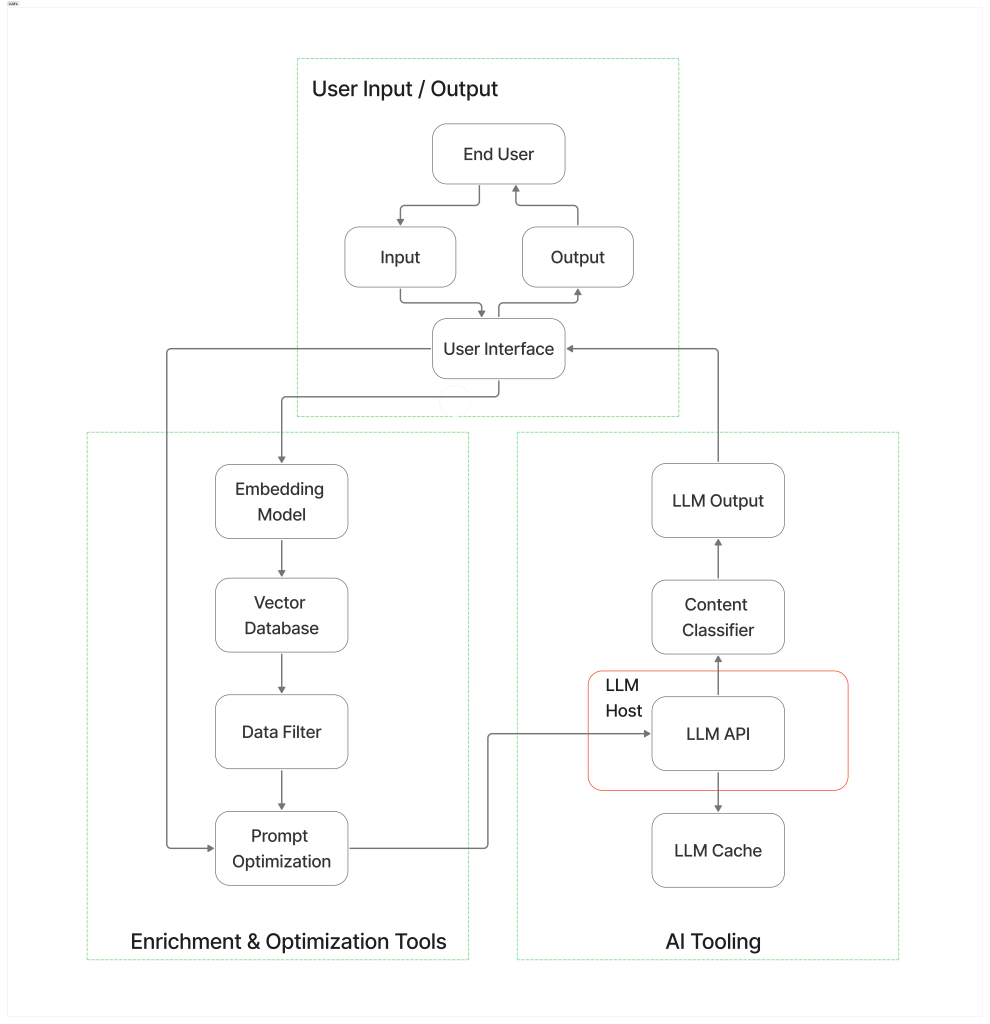
Figure 1. Example of an LLM architecture [3].

Implementing the model 

Implementing the model requires using a deep learning framework such as TensorFlow or PyTorch to design and assemble the model’s core architecture [4]. The key steps in implementing the model are: 

  • Defining the model architecture such as transformers and specifying the key parameters including the number of heads and layers.  
  • Implementing the model by building the encoder and decoder layers, the attention mechanisms, feed-forward networks and normalizing the layers.  
  • Designing input/output mechanisms that enable tokenized text input and output layers for predicted tokens. 
  • Using modular design and optimizing resource allocation to scale training for large datasets. 

Training the model 

Model training is a multi-phase process requiring extensive data and computational resources. These phases include: 

  1. Self-supervised learning where the model is fed massive amounts of data, so that it can be trained in language understanding and predicting missing words in a sequence.  
  2. Supervised learning where the model is trained to understand prompts and instructions allowing it to generalize, interact and follow detailed requests.  
  3. Reinforcement learning with Human Feedback (RLHF) involves learning with human input to ensure that output matches human expectations and desired behaviour. This also ensures that the model avoids bias and harmful responses and that the output is helpful and accurate.  

Fine tuning and customization 

Customization techniques include full model fine-tuning where all weights in the model are adjusted to focus on task-specific data. It is also possible to fine-tune parameters and engineer prompts to focus on smaller modules, saving resources and enabling easier deployment.  

Training a pre-trained model based on domain-specific datasets allows the model to specialize on target tasks. This is easier and less resource-intensive than training a model from scratch since it leverages the base knowledge already learned by the model. 

Model deployment 

Deploying the LLM makes it available for real-world use, enabling users to interact with it. The model is deployed on local servers or cloud platforms using APIs to allow other applications or systems to interface with it. The model is scaled across multiple GPUs to handle the growing usage and improve performance [5]. The model is continually monitored, updated and maintained to ensure it remains current and accurate.   

Ethical and legal considerations 

The ethical and legal considerations are important in the development and deployment of LLMs. It is important that the LLM is unbiased and that it avoids propagating unfair and discriminatory outputs. This extends to discriminatory and harmful content which can be mitigated through reinforcement learning with human feedback (RLHF).  

Training data may contain sensitive and private information, and the larger the datasets used to train the model the greater the privacy risks they involve. It is essential that privacy laws are adhered to and followed to ensure the models can continue to evolve and develop while preventing unintended memorization or leakage of private information. 

Copyright and intellectual property must also be protected by ensuring that the proper licenses are obtained. Regular risk and compliance assessments and proper governance and oversight over the model life cycle can help mitigate ethical and legal issues.  

Conclusion 

Developing and deploying an LLM in 2025 requires a combination technical, analytical and soft skills. Strong programming skills in Python, R and Java are critical to AI development. A deep understanding of machine learning and LLM architectures including an understanding of the foundational mathematical concepts underlying them, are also critical. It is also important to have a good understanding of hardware architectures including CPUs, GPUs, TPUs and NPUs to ensure that the tasks performed by the LLM are deployed on the most suitable hardware to ensure efficiency, scalability and cost-effectiveness.    

Other skills related to data management, problem-solving, critical thinking, communication and collaboration, and ethics and responsible AI are also essential in ensuring the models remain useful and sustainable. 

References 

[1] The Ultimate Guide to Building Large Language Models 

[2] Feedforward Neural Networks 

[3] The architecture of today’s LLM applications  

[4] How to Build a Large Language Model: A Comprehensive Guide 

[5] Large Language Model Training in 2025  

Large Language Models: Principles, Examples, and Technical Foundations

Introduction

Large Language Models (LLMs) are Artificial Intelligence algorithms that use massive data sets to summarize, generate and reason about new content. LLMs use deep learning techniques capable of broad range Natural Language Processing (NLP) tasks. NLP tasks are those involving analysis, answering questions through text translation, classification, and generation [1][2].

Put simply, LLMs are computer programs that can interpret human input and complex data extremely well given large enough datasets to train and learn from. The generative AI technologies that have been enabled by LLMs have transformed how organizations serve their customers, how workers perform their jobs and how users perform daily tasks when searching for information and leveraging intelligent systems.

The core principles of LLMs

LLMs are built on a set of neural networks based on the transformer architecture. Each transformer consists of encoders and decoders that can understand text and the relationship between words and phrases in it. The transformer architecture relies on the next-word prediction principle which allows predicting the most probable next work based on a text prompt from the user. Transformers can process sequences in parallel which enables them to learn and train much faster [2][3][4]. This is due to their self-attention mechanism which enables transformers to process sequences and capture distant dependencies much more effectively than previous architectures.

The transformer architecture consists of three key components:

  • Embedding: To generate text using the transformer model, the input must be converted into a numerical format that can be understood by the model. This process involves three steps that involve 1) tokenizing the input and breaking it down into smaller, more manageable pieces 2) embedding the tokens in a matrix that allows the model to assign semantic meaning to each token 3) encoding the position of each token in the input prompt 4) final embedding by taking the sum of the tokens and positional encodings, and capturing the position of the tokens in the input sequence.
  • Transformer block: comprises of multi-head self-attention and a multi-layer Perceptron layer. Most models stack these blocks sequentially, allowing the token representations to evolve though layers of blocks which in turn allows the model to build an intricate understanding of each token.
  • Output probabilities: Once the input has been processed through the transformer blocks, it passes through the final layer that prepares it for token prediction. This step projects a final representation into a dimensional space where each token is assigned a likelihood of being the next word. A probability distribution is applied to determine the next token based on its likelihood, which in turn enables text generation.

LLM applications

The transformer architecture allows LLMs to achieve a massive scale of billions of parameters. LLMs begin with pre-training on large datasets of text, grammar, facts and context. Once pre-trained, the models undergo fine-tuning where labeled datasets are used to adapt the models to specific tasks. The ability of LLMs to use billions of parameters, combined with their efficient attention mechanisms and their training capabilities, allows LLMs to power modern AI applications such as chatbots, content creation, code completion and translation.

Text generation: Chatbots and content creation

Text generation is one of the most prominent applications of LLMs where coherent and context-relevant text is automatically produced. This application of LLMs powers chatbots, like ChatGPT, that interact with users by answering questions, providing recommendations, generating images and conducting research [5].

GPT 4.5 and 4o feature multimodal capabilities allowing them to handle text and images for versatile use in different applications, and they can both handle text processing capacity of 25,000 words, though the amount of computational resources varies between the two models.

By leveraging their vast datasets, LLMs are also used for content creation such as social media posts, product descriptions and marketing. Tools like Copy.ai and Grammarly use LLMs to generate marketing copy, and assist with grammar and text editing. DeepL Translator uses LLMs trained on linguistic data for language translation.

Agents

Agentic LLMs refer to conversational programs such as chatbots and intelligent assistants that use transformer-based architectures and Recurrent Neural Networks (RNNs) to interpret user input, process sequential data such as text, and generate coherent, personalized responses [6]. Personalized responses to input text are achieved through context-awareness and analyzing conversations.

Agentic LLMs are also capable of managing complex workflows and can collaborate with other AI agents for better analysis. Vast datasets can be leveraged to support a variety of domains such as healthcare, finance and customer support.

Code completion

Code completion is a leading application of LLMs that uses the transformer-based  architecture to generate and suggest code by predicting next tokens, statements or entire code blocks. In this context, transformer models are trained using self-attention mechanisms to enable code understanding and completion predictions [7]. The encoder-decoder transformer model is used such that the input is code surrounding the cursor (converted into tokens), and the output is a set of suggestions to complete the current or multiple lines.

Challenges and future directions

Large Language Models are still facing challenges related to ethical and privacy concerns, maintaining accuracy, avoiding bias, and managing high resource consumption [8].

  • Ethical concerns: LLMs are trained on massive datasets. There are still open questions as to who can use these datasets, and how and when they can be used. These datasets can also be biased and lead to biased output from LLMs, which can lead to misinformation and hate speech.
  • Data privacy: The use of massive datasets containing large amounts of user data poses significant privacy concerns. Safeguards in the use of data are required to train a model without compromising user privacy. As the use of LLMs becomes more mainstream, and as the size of datasets used to train them increases, so do the privacy concerns around their use.
  • Output bias: Existing biases in the available training data can cause LLMs to amplify those biases, leading to inaccurate and misleading results. This is particularly important for areas that require objective data analysis and output, such as law, healthcare and economics.
  • Hallucinations: LLMs are prone to “hallucinations” where the model output may seem reasonable, yet the information provided is incorrect. Hallucinations can be addressed through better training and validation methodologies to enhance the reliability of generated content.
  • Environmental impact: Training and deploying LLMs requires an extensive amount of energy resources, leading to increased carbon emissions. There is a need to develop more efficient algorithms while also investing in renewable and efficient energy generation that will lower the carbon footprint of LLMs, especially as their use and application accelerate.

Addressing these and other challenges such as regulatory compliance, security and cyber attacks will ensure that LLMs continue to use the correct input datasets while producing the correct output in an ethical, fair and unbiased manner. The integration of domain-specific knowledge through specialized fine tuning will also enable LLMs to produce more accurate and context-aware information that will maximize their benefits.

Conclusion

LLMs power a variety of applications, including chatbots to content creation, code completion and domain-specific automation. Using the transformer architecture and vast datasets to train and learn, they have emerged as a transformative discipline of artificial intelligence. LLMs have proved their outstanding capabilities in understanding, generating, and reasoning with natural language. While there are challenges to overcome for LLMs such as bias, accuracy, environmental impact, and domain specialization, it is expected that LLMs will become more efficient and trustworthy as algorithms improve and innovations are achieved through better fact-checking and human oversight.

References

[1] What are large language models (LLMs)

[2] What are large language models (LLMs)

[3] What is LLM (Large Language Model)?

[4] Transformer Explainer

[5] 10+ Large Language Model Examples & Benchmark 2025

[6] Chatbot Architecture: RNNs and Transformers

[7] ML-Enhanced Code Completion Improves Developer Productivity

[8] Raza, M., Jahangir, Z., Riaz, M.B. et al. Industrial applications of large language models. Sci Rep 15, 13755 (2025). https://doi.org/10.1038/s41598-025-98483-1

How My Human-Computer Interaction (HCI) Research Shaped My Design Career

“Research in HCI continues to be the primary contributor of the methodologies, technologies and tools we use to support modern application design, and it continues to remind us that the origins of design as a discipline have always been deeply rooted in how humans interact with computers.”

Introduction

The methodology and best practices behind design are constantly evolving, yet they have always been deeply rooted in Human-Computer Interaction (HCI). I think about how my career progressed in context with the rapidly changing nature and landscape of design and usability, especially when it comes to the lightning speed with which AI technologies have evolved and the ubiquity of user interfaces and technologies supporting them.

I have always viewed my time at Queen’s University and my research as a graduate student as the foundation of my career. I did not set out to pursue a career in design or usability when I started my graduate studies. In fact, I thought that my career would evolve around software development or solutions architecture. I had a good theoretical foundation during my undergraduate studies, yet the idea of choosing a research topic that is yet to be explored seemed daunting to me at first. Among all the specialized fields of study in Computer Science such as Data Mining, Machine Learning, and Parallel Computing, I knew that Software Engineering was a topic that I was interested in exploring further.

The research I embarked on with the help of my advisor, Prof. Nick Graham, involved researching and programming user interface libraries that developers would use to write applications [1]. It would take me years after completing this work to realize the significance of its contribution to HCI. That’s because I was initially focused on the execution of the ideas in my research, and designing and writing code to implement user interface libraries. However, the two years I spent doing this work would prove to be transformative in my understanding of application design, and in how my research would shape my thinking and work as a user experience designer, a product designer and an interaction designer.

The Origins of User Experience in HCI

To understand the origins of user experience design and how it evolved, it is important to shed light on how deeply rooted it is in HCI.

The term “User Experience” (UX) was originally coined by Don Norman while working at Apple in the early 1990s. On why he coined the term Norman writes [2]:

“I invented the term because I thought Human Interface and Usability were too narrow. I wanted to cover all aspects of the person’s experience with the system.”

Long before Norman proposed the term “User Experience”, Human-Computer Interaction emerged as a formal research field in Computer Science in the early 1970s and 1980s.

In 1982, the Special Interest Group on Computer-Human Interaction (SIGCHI) was established under the Association of Computing Machinery (ACM). SIGCHI was established as a global body to focus on the emergence of Human-Computer Interaction in the 1970s and 1980s as a major field of Computer Science research, and the rapid shift in computing from command-line interfaces to graphical user interfaces (GUIs). This shift highlighted the importance of human factors, cognitive psychology and ergonomics as key elements in the design of interactive systems.

Since its establishment, SIGCHI has become the most prominent international conference where top HCI researchers and design practitioners present new theories, models and technologies that have helped shape the field of usability and user experience design. SIGCHI cemented the role of HCI as a discipline of Computer Science and established the core theories, principles and methodologies behind the user experience design practice as we know it today, including usability testing, interaction design and service design.

In the Psychology of Human-Computer Interaction, Card, Moran and Newell [3] highlighted the user as the key information processor. Therefore, good systems design must focus on understanding human perception, memory and problem solving rather than hardware and programming. Furthermore, since human attention, memory and perception are limited and predictable, the system must be designed with these considerations in mind.

Card, Moran and Newell established key models that helped establish the foundations of UX research and usability today, with the most notable one being the Model Human Processor (MHP) model. The MHP model identifies the human mind as comprising of three main subsystems:

  • Perceptual – responsible for sensory, visual and auditory input and output.
  • Cognitive – responsible for thinking, reasoning and short-term memory.
  • Motor – responsible for all motor skills required for a user to interact with a system such typing, mouse movement and pointing, and eye tracking.

Jakob Nielsen helped further shift the focus in application development on the user when he formalized the role of usability in software engineering in his book Usability Engineering [4]. Nielsen argued that usability must be an integral part of the software design and development cycle through rapid, iterative, and low-cost methods. Nielsen also defined the five key components of usability as learnability, efficiency, memorability, errors and satisfaction. These components remain the cornerstones of user experience design and its role in the software development lifecycle today.

My Research in HCI Shaped My Mindset As a Designer

My research focused on the topic of User Interface Plasticity, which turned into a published article in an HCI journal [1]. I explored how simple user interface widgets such as a menu and a scrollbar could behave on a desktop computer and a digital whiteboard. I wrote libraries that allowed developers to write an application that automatically rendered scrollbar and menu widgets and adapted them to the device they were running on. In other words, the menu and scrollbar widgets retained plastic properties, which meant they could be ‘molded’ to match the the device they are deployed on. In designing the menu and scrollbar widget libraries, I needed to shift my focus from implementing libraries for the menu and scrollbar widgets to thinking about how these widgets would be used by the users along with the context and device. This relates back to the need to consider the perceptual, cognitive and motor subsystems discussed by Card, Moran and Newell in the MHP model.

The launch of the iPhone (2007) a few years after my research was published, and the iPad a few years after that, sparked a rapid pace of development in UI frameworks for mobile devices and tablets. This pace of development was propelled by the growing adoption of the web coupled with a user base that became increasingly sophisticated, with clear expectations on how applications should behave depending on the devices they were using. The launch of the iPhone and iPad allowed me to understand the importance of my research in defining how user interfaces behaved on different devices.

More importantly, my research shaped my understanding of how applications should behave on difference devices, and how application design overall is governed by the principles of HCI. Until that point, I was trained to write command-line programs on Linux using C, and as long as the program behaved as expected on the command line by providing the right prompts to the user, receiving the required inputs and producing the correct output, the program was considered successful.

Conclusion

The rise of Human-Computer Interaction in the 1970s and 1980s came out of a growing need to enable software applications to better serve users. It was no longer sufficient to expect that command line interfaces would be able to satisfy the needs of all users. As devices and the web evolved, so did users’ expectations of how applications should behave on the variety of devices available.

HCI was still growing as field of research in Computer Science when I embarked on my research at Queen’s University with Prof. Graham, yet it profoundly shaped my mindset as a designer, and how I approached design problems in various industries throughout my career. My research helped lay the conceptual foundations for device-independent UI frameworks that fed into ubiquitous computing, multi-platform design frameworks, adaptive UIs for smart devices and early thinking about device independence and context awareness. Through this work I was able to practice novel concepts at the time such as the MHP model, and other concepts introduced by Nielsen on usability in software engineering.

All of this work helped focus me on solving design problems and designing applications with a clear focus on user interaction. This is why I believe that as designers we must ensure that we always maintain a thorough understanding of the theory and research the HCI field offers. The core foundations of design have always been deeply rooted in Human-Computer Interaction, in Computer Science and in Psychology. Research in HCI continues to be the primary contributor of the methodologies, technologies and tools we use to support modern application design, and it continues to remind us that the origins of design as a discipline have always been deeply rooted in how humans interact with computers.

If this story resonates with you — or if you’re tackling challenges at the intersection of UX design, usability, and emerging technologies like AI — I’d love to connect.

Whether you’re working on adaptive interfaces, modernizing legacy systems, or simply want to apply HCI principles more deeply in your product design, I help teams bridge research, strategy, and practical execution.

Feel free to reach out through LinkedIn. Let’s explore how thoughtful, human-centered design can transform your next project.

References

[1] Jabarin, B., & Graham, T. C. N. (2003). Architectures for widget-level plasticity. In Proceedings of the 10th International Workshop on Design, Specification, and Verification of Interactive Systems.

[2] Norman, D. A. (n.d.). The Definition of User Experience (UX). Nielsen Norman Group. Retrieved July 9, 2025, from https://www.nngroup.com/articles/definition-user-experience/

[3] Card, S. K., Moran, T. P., & Newell, A. (1983). The Psychology of Human-Computer Interaction. Hillsdale, NJ: Lawrence Erlbaum Associates.

[4] Nielsen, J. (1993). Usability Engineering. Boston, MA: Academic Press.

Designing with Empathy: A Universal Practice for Meaningful Collaboration

In an era marked by the rapid advancement of artificial intelligence, it is reassuring to recognize that the human capacity for empathy remains unique and irreplaceable.

Introduction

On a recent project I worked on I found that I was not very clear on the subject matter and the complexity of the problems that were presented. I did not know any of the business stakeholders well, and while I had previously worked with some of the project team members, I had not yet developed a meaningful working relationship with them. I needed to get up to speed quickly so that I could start thinking about how to run discovery sessions, and how to frame the problem and ask the right questions in my stakeholder interviews.

To arrive at that stage I needed to get to know the stakeholders, understand what was important to them and what motivated them to embark on this project. To accomplish this, I spent time both privately and in group discussions with the stakeholders. The one-on-one interviews I initially conducted with the stakeholders and the group discovery workshops were helpful in allowing them get to know me as a person first, before being the individual filling the role of the designer on the project.

I was able to gain the stakeholders’ trust by showing that my role was first and foremost focused on understanding their needs and goals, and that I was immersing myself in their experiences. This was essential for the stakeholders because they were trusting me to lead the design on a project that impacted their day-to-day work, and it was also essential for me to help establish a strong foundation and build trust as I embarked on this project.

When I reflect on how I was able to arrive at that stage of trust and partnership with the stakeholders, I realize that it was the fact that I understood and related to how they felt about their work, and that I tried to put myself in their shoes by rephrasing and reconfirming my understanding of their problems. I was successful in letting the stakeholders know that that they were not alone in the challenges they were facing, and that I was there to understand the problems they were trying to solve by really imagining myself as part of their team. I wanted to show that I could relate to them so that together we could start a journey to gain a better perspective and create a great solution.

This example is only one of many I can reflect on throughout my career as a designer, where I realized the fundamental role empathy plays in providing reassurance to myself and others I worked with, that we all shared a mutual care and understanding of our experiences and goals.

In this post, I explore the need for designers to consistently practice empathy throughout all aspects of their role. For designers, empathy extends beyond end users, encompassing every individual involved in the design process, including stakeholders and colleagues. I refer to this as Universal Empathy, wherein a designer is expected to genuinely understand and relate to everyone within their professional sphere to effectively create products that are usable, impactful, and successful.

Why Empathy Matters In Design

In psychology, empathy is defined as the capacity to comprehend and share the feelings of another individual. This extends beyond courteous or considerate behavior, involving the ability to perceive situations from another person’s perspective, understand their emotions, and respond appropriately in alignment with their perspective. Such an understanding allows individuals to convey genuine support, assuring others that their experiences are acknowledged and their needs are recognized.

Tim Brown identifies empathy as a fundamental element in design thinking, particularly when addressing complex problems [1]. As a human-centered methodology, design thinking requires a comprehensive understanding of users’ needs, business requirements, and relevant organizational and technological considerations to achieve successful product development.

Kouprie and Visser [2] provide an in-depth examination of the role of empathy in design by presenting a four-phase model. They describe how designers should adopt a dynamic, multi-stage approach to empathy that includes the following phases:

  • Discovery: In this phase, designers remain inquisitive, actively observing, learning, and asking questions about users.
  • Immersion: This phase involves designers engaging directly in the user experience through interviews, observation sessions, and shadowing activities.
  • Connection: At this stage, designers identify with users and establish a genuine understanding of their feelings regarding their experiences.
  • Detachment: Finally, designers apply their insights objectively, ensuring that design decisions are informed by the observations gathered during earlier stages.

The work by Kouprie and Visser further underscores the designer’s essential role in acting as a catalyst for the phases of empathy. This helps foster the creation of effective solutions that serve both end user and organizational goals.

Universal Empathy

I would like to emphasize how the designer’s universal approach to empathy is essential to their success, the success of their team, and ultimately the success of the products they design. This approach is essential throughout the product design lifecycle, beginning with the design thinking phase and through to the development and implementation phase. Designers play a pivotal role, not only in guiding design discovery and generating research-driven concepts, but also in fostering team cohesion and promoting a collaborative culture rooted in empathy. The designer accomplishes this by bridging the gap between the user needs, stakeholder needs and the project team needs by fostering a comprehensive understanding of the goals of everyone involved in the project.

The designer cultivates universal empathy by:

  • Listening to, understanding and connecting with user needs, connecting with their experiences and knowing when to disconnect in order to be able to make objective design decisions.
  • Building trust with stakeholders and connecting with their needs and establishing a strong foundation to collaborate on building a product that meets the needs of both the business and the end users.
  • Facilitating their team’s understanding of technical design aspects by readily addressing questions, remaining attentive to the team’s needs, and helping when required.
  • Fostering an overall inclusive environment that recognizes and values feedback from everyone in their sphere, promotes successful collaboration and addresses the diverse requirements and viewpoints involved in the design process.

Conclusion

I have consistently found that demonstrating empathy toward those around me has contributed significantly to my success in my work and my career. By cultivating this approach, I learned to listen, understand, acknowledge and fully immerse myself in the experiences and feedback from users, business stakeholders, and my colleagues alike.

I have also been able to help to foster a culture in which individuals support one another and feel comfortable seeking assistance when needed. In my experience, such an environment always promoted greater job satisfaction, personal growth and stronger professional relationships that extended beyond individual tasks and contributed towards shared goals.

In an era marked by the rapid advancement of artificial intelligence, it is reassuring to recognize that the human capacity for empathy remains unique and irreplaceable.

References

[1] Brown, T. (2009). Change by Design: How Design Thinking Creates New Alternatives for Business and Society. Harvard Business Press.

[2] Kouprie, M., & Visser, F. S. (2009). A framework for empathy in design: Stepping into and out of the user’s life. Journal of Engineering Design, 20(5), 437–448.